VisuCode

In the browser · no sign-up · with self-study courses

See digital learning
and understand it.

With VisuCode you learn how computers, robots and websites work – by building something yourself and seeing right away what happens. Every app comes with its own course, for the classroom just as well as for home, simply out of curiosity.

Explore the apps Cheat sheets

  • 11 apps
  • 9 ready to use
  • Hardware in the simulator

What do you want to learn?

Eleven apps – you decide where to start

Beta runs reliably and keeps growing · Alpha in the lab: already works, but may still change · Coming soon in preparation

🧑‍🏫 For teachers 🎓 Moodle

VisuDesk

Your teaching in one place.

Your Moodle course on the left, the folders on your Mac on the right. Drag a worksheet into the right section, download submissions with one click – without the Moodle website.

  • Drag & drop instead of clicking
  • Download submissions
  • Back up courses
  • App for the Mac
Version 0.48.2 To VisuDesk
VisuDesk: the Moodle course on the left, the folders on the Mac on the right

Why visual?

Think visual. Code together.

Programming is abstract. VisuCode makes it visible: you get to the bottom of a problem, break it into parts and see how they fit together.

Structure Classes show what exists.

🔍 Method calculateAverage() from the inside

Flow Structograms show how it runs.

Lena“What happens if there are no grades yet?”

Tom“Then we take the true branch on the left and return 0.”

Lena“Otherwise the loop runs over all the grades.”

Conversation Around the diagram your team discusses the approach – before anyone writes code.

🎒 For learners

  • Finally see what happens. You see every step of your program instead of guessing.
  • Get to the bottom of problems. You break a task into parts, recognise structures and build your own solution from them.
  • Find bugs instead of despairing. The simulation shows you in the diagram and in the code where it goes wrong.
  • At your own pace. Short lessons, games and instant feedback – at school and at home.

🧑‍🏫 For teachers

  • Talk about the approach as a team. The diagram becomes a shared language: groups plan together and explain their solution.
  • Make understanding visible. The diagram shows you at a glance whether someone has understood the problem – not just whether the code runs.
  • Ready to teach. Lessons with competences, checklists, tests and automatically checked exercises.

And along the way: if you can think about a problem in structures, you also give clearer instructions – to your team and to an AI.

  1. 👀 Understand
  2. 🧩 Structure
  3. 💬 Discuss
  4. 🛠 Build
  5. ✅ Check

Programming you can see

Hands-on – even without hardware

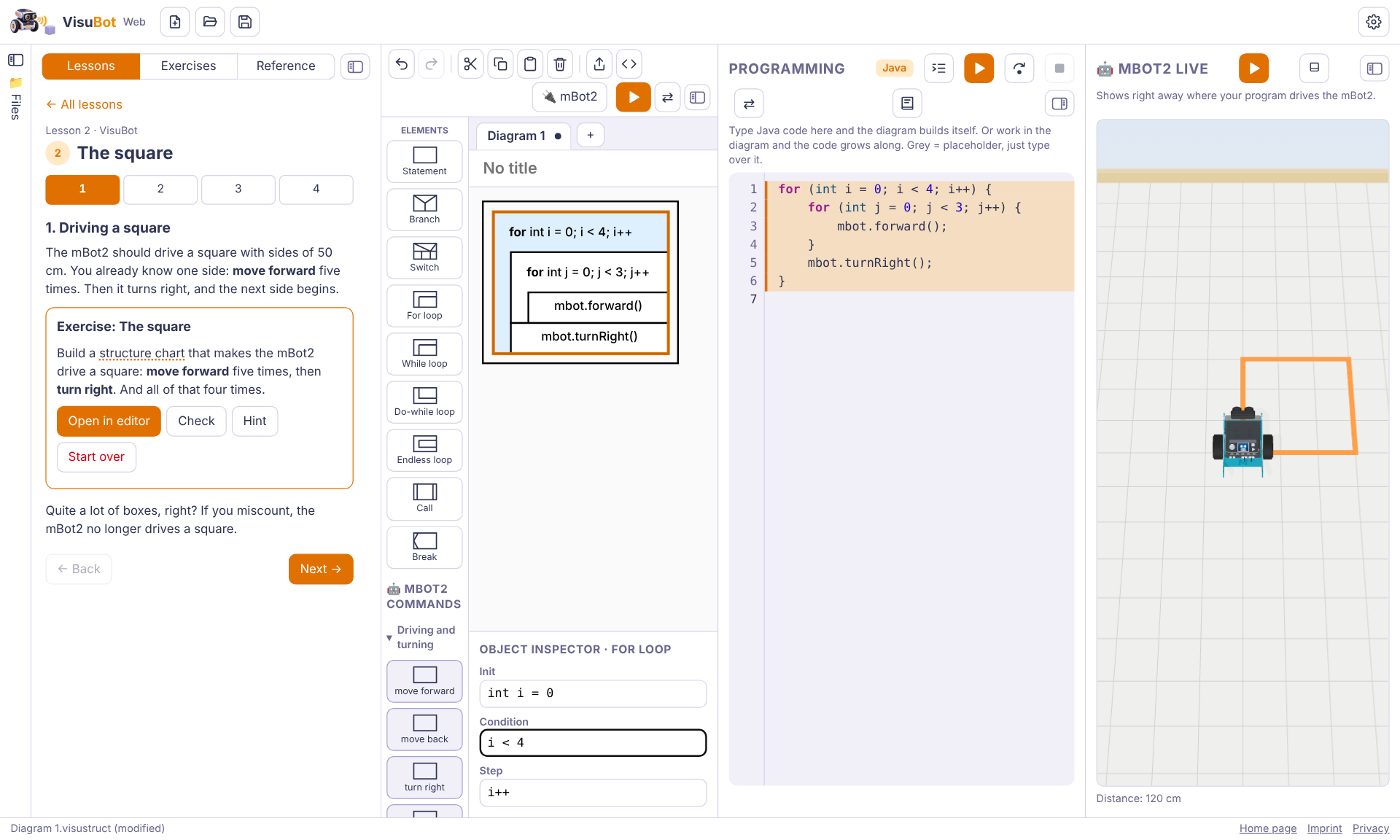
The robot drives in the 3D simulator, the microcontroller lights up its LEDs on screen. You see right away what your program does – nothing stays abstract. If you have the real hardware, it simply drives along via USB. But you don’t need it.

  • mBot2 in the 3D simulator
  • Microcontroller on screen
  • real hardware optional
Try VisuBot
VisuBot: structogram, Java and the mBot2 in the 3D simulator

How VisuCode works

Learning in small steps

  1. 1

    Read

    Each lesson is short and explains exactly one thing – with pictures and examples to follow along.

  2. 2

    Try it out

    Right next to it you build it yourself: in the editor, in the simulator or on the real device.

  3. 3

    Check yourself

    Exercises are checked instantly. Your progress stays on your device – nothing is stored or graded.

To print

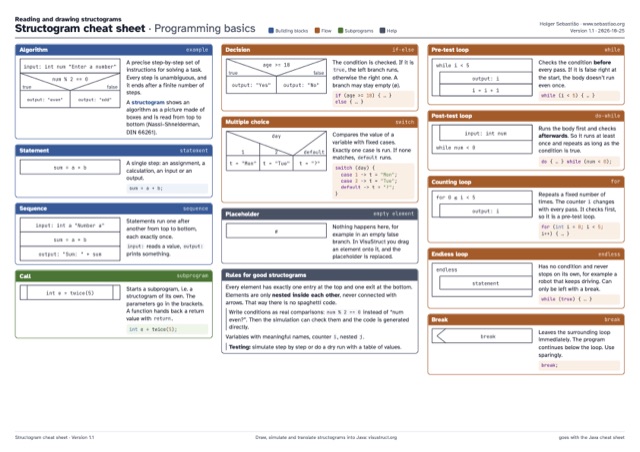
Cheat sheets: the essentials on one page

Java, structograms, OOP & UML, VisuBot, HTML & CSS, JavaScript, ER models, SQL and podcasting – as PDF to keep next to you, in German, English and Portuguese.

To the cheat sheets

Ludwig the billy goat
“I like to chew on difficult things until they become really simple.”

– Ludwig the billy goat, part of every Visu tool

Learning & Teaching

For the classroom and for self-study

All apps are developed at the Ludwig-Geißler-Schule in Hanau, Germany, and are used there in lessons. Thanks to the self-study courses, you can use them just as well on your own – simply out of curiosity.

  • Privacy without the hassleNo sign-up, no accounts, no data collection. Your progress stays on your device.
  • Works with MoodleIn class you hand in your progress as a file. With our Moodle plugins (page in German), teachers create automatically graded tests and put worksheets straight into the course.
  • Ready right awayEverything runs directly in the browser – no installation, in class as well as at home.